Have you ever seen a photo of a cool pair of shoes and wondered where to buy them? Or maybe you saw a beautiful sunset and wanted to know exactly where it was taken. This is where reverse image search becomes your best friend. Instead of typing words into a search bar, you use a picture to find answers. It is like having a digital detective in your pocket. In this guide, we will look at how this magic works and why it is so helpful for everyone.
Using reverse image search is much easier than most people think. You do not need to be a tech genius to master it. You simply upload a file or paste a link to a photo. Then, the computer looks at the colors, shapes, and patterns to find matches. It helps you find the original creator of a drawing or check if a profile picture is real. By the end of this article, you will be an expert at finding the truth behind any image you see online.
What is Reverse Image Search Exactly?
At its heart, reverse image search is a special technology that looks at images instead of text. When you search for “cute cats,” the computer looks for those specific words. But when you use an image, the computer “sees” the pixels. It compares your picture to billions of others on the internet. This helps you find where a photo first appeared or find higher-quality versions of the same shot. It is a powerful tool for discovering new things without needing to know their names.
Why You Should Use Search by Image Tools
There are many reasons to try reverse image search today. First, it helps you spot “fake news” or edited photos. If someone shares a photo of a flying car, you can check if it was just a movie prop. Second, it is great for shopping. You can snap a photo of a chair you like at a cafe and find out who sells it. Lastly, it helps artists see if someone else is using their work without permission. It keeps the internet a more honest and organized place for all users.
How to Do a Reverse Image Search on Your Phone
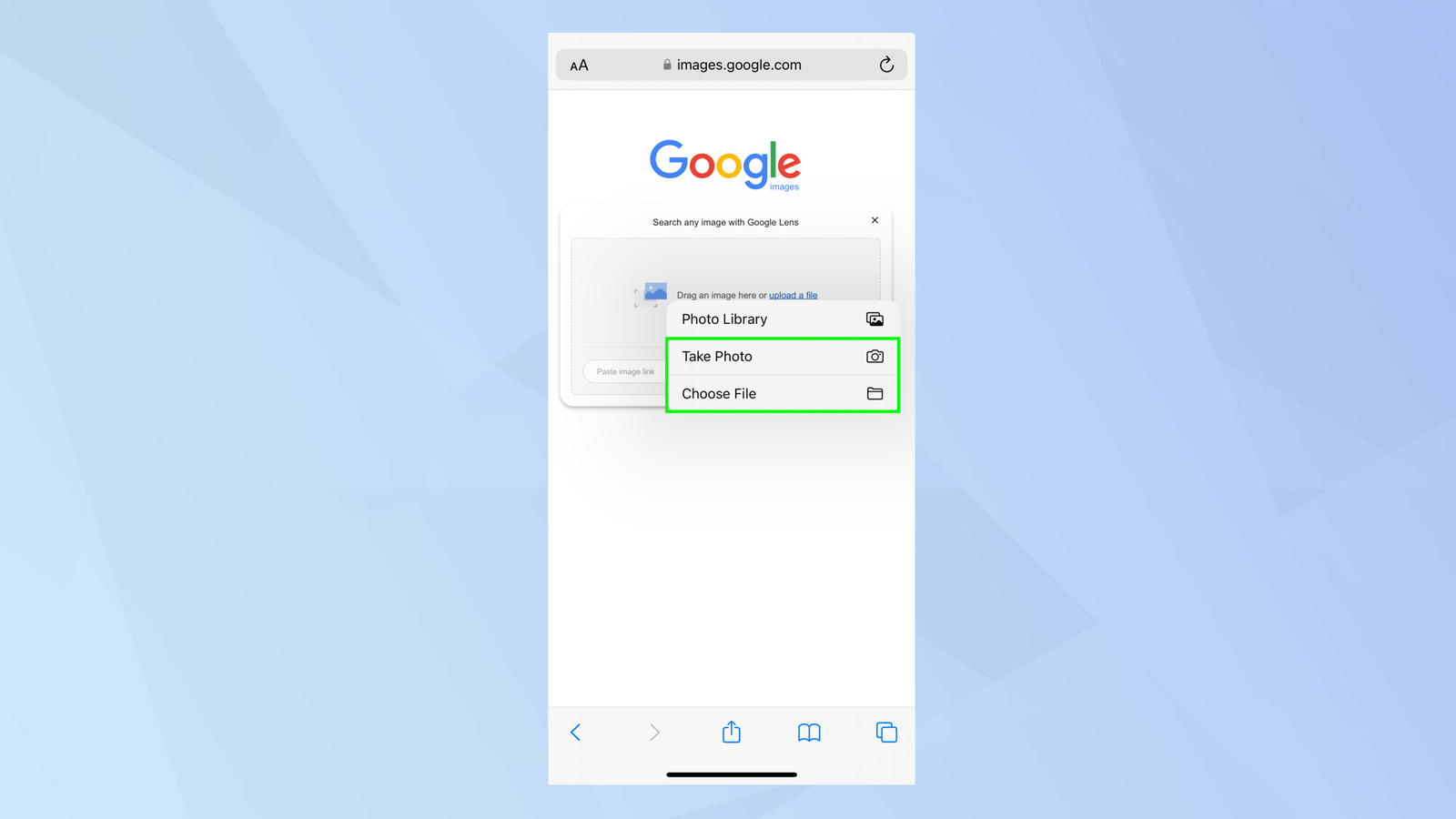
Most people spend their time on mobile devices, so knowing how to use reverse image search on a phone is vital. On an iPhone or Android, you can use the Google app. You just tap the camera icon in the search bar. This opens “Google Lens,” which is a smart tool for looking at the world. You can select a photo from your gallery or take a new one right then. It will instantly show you similar images and websites that mention that specific picture.
Finding the Original Source of a Photo
Sometimes, you see a famous quote on a pretty background, but you want to find the photographer. A reverse image search can lead you back to the very first time that image was posted. This is very important for giving credit to the right person. If you are writing a school project or a blog, you want to make sure your facts are right. Finding the original source ensures you are not sharing something that was stolen or changed by someone else along the way.
Identifying Plants and Animals Instantly
Have you ever been on a hike and seen a strange purple flower? You can use reverse image search to identify it in seconds. This works for bugs, trees, and even dog breeds too. Just take a clear photo and let the search engine do the heavy lifting. It will tell you the name of the plant and if it is safe to touch. This turns every walk in the park into a fun science lesson. It is a great way for kids and adults to learn about nature together.
How to Spot Scammers Using Image Tools
Safety is a big deal online, especially on social media. Scammers often steal photos of handsome or pretty people to make fake profiles. If you are talking to someone new, you can do a reverse image search on their profile picture. If that same photo shows up on a stock photography site or belongs to a famous actor, you know it is a fake. This simple step can protect you from “catfishing” and keep your personal information safe from people who want to trick you.
Improving Your Shopping Experience
Shopping online can be tricky if you do not know the brand name of an item. Maybe you saw a celebrity wearing a neat jacket in a magazine. By using reverse image search, you can find that exact jacket or even cheaper options that look just like it. Many shopping apps now have this feature built-in. It saves you hours of scrolling through websites trying to find the right keywords. It makes finding the perfect gift for a friend much faster and more fun.
Verifying Landmarks While Traveling
When you go on vacation, you might take hundreds of photos of old buildings and statues. Later, you might forget what they were called. You can upload those vacation photos to a reverse image search engine to get the names and history of the landmarks. It helps you organize your travel albums with correct titles. You can even find the best times to visit those spots or read reviews from other travelers who were there. It is like having a tour guide that lives in your camera.
Best Websites for Reverse Image Searching
While Google is the most famous, there are other great sites for reverse image search. TinEye is a very popular one because it focuses specifically on finding where images live online. Bing also has a very powerful visual search tool that works well for products. Some people prefer Yandex for finding faces or specific locations. Each tool has its own strengths, so if you do not find what you need on one, you can always try another. It is good to have a few options.
Protecting Your Own Creative Work
If you are a photographer or an artist, your work is your life. Sadly, some people might copy your images and put them on their own websites. Regularly performing a reverse image search on your own best pieces is a smart move. If you find someone using your art without asking, you can ask them to take it down or give you credit. This helps you stay in control of your digital footprint. It ensures that your hard work stays yours and that you get the recognition you deserve.
Biography Table: Key Figures in Visual Tech
| Name | Role | Connection / Achievement |
| Larry Page | Google Co-founder | Helped build the world’s largest image index. |
| Sergey Brin | Google Co-founder | Innovated how we “see” data on the web. |
| Lei Fan | Researcher | Contributed to early computer vision and AI. |
| Kevin Systrom | Instagram Founder | Changed how we share and tag visual content. |
Conclusion
The world is full of images, and now you have the power to understand all of them. Whether you are checking a fact, shopping for a dress, or identifying a bird, reverse image search is the ultimate tool. It makes the internet feel smaller and more connected. Next time you see a photo that puzzles you, don’t just wonder—search it! It is a fast, fun, and free way to become more informed about the world around you. Give it a try right now with a photo on your phone!
Frequently Asked Questions (FAQs)
1. Is reverse image search free to use?
Yes! Most major tools like Google Lens, Bing Visual Search, and TinEye are completely free for everyone to use.
2. Can I search for a person’s face?
You can, but it is mainly used to find where that specific photo appears online. It is a great way to see if a profile is real or fake.
3. Does it work on screenshots?
Absolutely. If you take a screenshot of a video or a social media post, you can upload that screenshot just like a regular photo.
4. Is my privacy safe when I upload a photo?
Most big search engines use the photo only to find matches. However, it is always a good idea to read the privacy rules of the site you are using.
5. Why can’t I find a match for my photo?
If a photo is brand new or very private (like a family photo), it might not be on the internet yet. The search engine can only find photos that have been posted online before.
6. What is the best app for this on Android?
The Google app is usually the best choice because it comes with Google Lens, which is very fast and accurate for all kinds of searches.